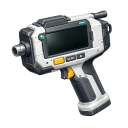
| Item | OreScannerTool |
|---|---|
| Module | ARCHEAN_celestial |
Description
The Ore Scanner Tool is a handheld device that displays mineral composition in the direction you're facing. It shows a real-time graph of ore density versus distance, allowing you to locate ore deposits before mining.
This tool is different from the OreScanner component - while the component is meant to be mounted on vehicles and controlled via XenonCode, the Ore Scanner Tool provides an immediate visual interface for the player.
Usage
Basic Operation
- Equip the Ore Scanner Tool from your inventory
- Point in the direction you want to scan
- The tool displays a graph showing ore concentrations along that direction
Interface
The scanner window shows:
- Distance selector: Choose scan range (100m, 250m, 500m, or 1000m)
- Ore checkboxes: Select which ores to display on the graph
- Graph: Shows ore density (Y-axis) vs distance (X-axis)
Ore Types
The scanner can detect the following ores:
| Symbol | Element | Color |
|---|---|---|
| Al | Aluminium | Silver/Light Gray |
| C | Carbon | Black |
| Cr | Chrome | Gray Metallic |
| Cu | Copper | Orange |
| Au | Gold | Yellow Gold |
| F | Fluorite | Purple |
| Fe | Iron | Rusty Brown |
| Pb | Lead | Dark Gray |
| Ni | Nickel | Greenish Gray |
| Si | Silicon | Dark Blue |
| Ag | Silver | Bright Silver |
| Sn | Tin | Grayish |
| Ti | Titanium | Blue-ish |
| W | Tungsten | Dark Gray |
| U | Uranium | Green |
Scanning Tips
- The scan direction is based on the horizontal component of your view direction
- The graph updates automatically as you move or change direction
- Select multiple ores to compare their locations
- Iron (Fe) is selected by default as it's the most common resource
Note: The Ore Scanner Tool requires being on a celestial body with terrain data. It won't function in space or in environments without terrain composition data.